MatConvNet with Visual Studio 2015.3 Toolset and MATLAB R2017a
Introduction
After a recent re-install of Windows on my laptop, I decided to install the latest version of the software packages that I frequently use. This include MATLAB R2017a ,Visual Studio 2017 Enterprise and MatConvNet.
However, it turns out that MATLAB R2017a does not support using VS2017 out of the box (patch required). What’s worse is that CUDA Toolkit 8.0 also doesn’t support VS2017 yet.
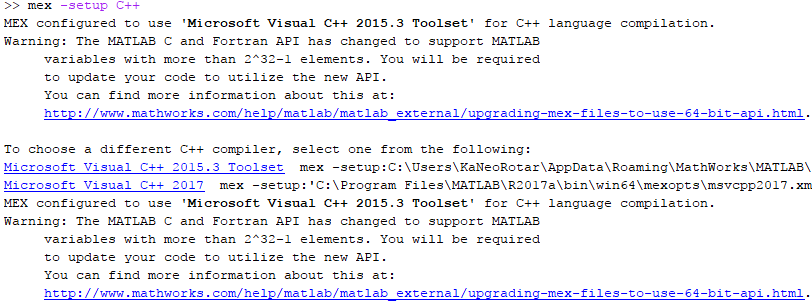
In order to use MatConvNet for my research, I had to install VS2015.3 Toolset (optional component of VS2017) and configure MATLAB R2017a to use it.
System Environment
| Component | Version |
|---|---|
| OS | Windows 10 Home 1703 Build 15063.0 |
| MATLAB | R2017a |
| CUDA Toolkit | 8.0.61 |
| CuDNN | 5.1 |
| Visual Studio | 2017 Enterprise with 2015.3 Toolset |
Bad Apple ASCII Javasrcipt字符画版| Bad Apple ASCII Javascript
PMangar再启动计划 | Revival of PMangar
大概是从去年开始着手制作了一个简陋的看漫画用的php网站PMangar,功能只有通过股沟在178上面搜索与输入字符相关的漫画,然后一页一张图的方式进行浏览,当时在Kindle和手机上测试效果都还凑合,于是就收工了。近来无事,于是又测试了一下,发觉功能基本失效,于是重新检查和改进,总算是又能恢复使用了。传送门在此:http://rotar.tk/pm
本文便用来记录复活PMangar过程中的领悟和心得,与诸君共勉。
————————–Lang Sep—————————–
PMangar was an simple php application that fetches comics from 178.com and display it to the user. In other words, its just an online comic viewer. The work are considered done in last year as the result of using it on both Kindle and my Nokia phone seems to be satisfactory. However, when I checked the application few days ago, nothing seems to be working and therefore I’m here to repair and upgrade it. The currently working version is available at http://rotar.tk/pm.
This post intend to share what I’ve learnt about php during the process and hope it may help.
这学期要忙起来了| Getting busy this semester
Python 笔记01| Notes about Python 01
学校图书馆真吵| University library is really noisy
转眼十数年过去,小学,初中,和高中都已经成为历史,而大学生涯也仅剩最后一年。怀着满腹希望的俺来到英国接受第三年的学习和生活。临行之前便听了讲座,意识到了出国学习可能面临的“文化冲击”。
于是到来之后保持着谨慎的态度接受着“异国风情”的熏陶。所幸近几个月内并未感到什么冲击,但是值得一提的就是国外大学的图书馆。回顾以往,自小受到的教育就告诉我们:图书馆是一个安静的地方。无论是老师们的嘱咐,图书馆管理员的神情,还是墙上挂着的大大的“静”字都无时无刻的提醒着我们。作为结果,俺自以为养成了在图书馆能够保持安静的好习惯。
雅思啊| IELTS…
总算在64位Win7下VS2010里把OpenCV 2.1运行库正确地编译安装完了(附安装指南)| Finally finished building the correct OpenCV 2.1 libraries in Visual Studio 2010 under Windows 7 64bit (Install guide added)
由于Project需要用到OpenCV的库,所以折腾数周,总算搞定了,期间试了无数次,OpenCV的库每次都能在Debug和Release下全部编译成功。但自己新建的工程无论如何修改配置都会出现LNK的fatal error,股沟多次得出结论:库文件添加错误。但是对照之后发现一模一样,于是郁闷多日不得解。今日再做尝试,在CMake中选择了“Visual Studio 2010”而不是之前的“Visual Studio 2010 Win64”,generate,然后打开VS进行Rebuild,添加到自己的工程之后奇迹般的成功了。于是在此记上一笔,免得他人步上俺的后尘。末尾附上英文安装过程。
————————–Lang Sep——————————–
I’ve been trying to get OpenCV installed on my laptop for a couple of weeks. I’m in need of it because of my project. The installation needs the OpenCV source files to be compiled into libraries and then will it be used in my own C project. I’ve tried several times of compiling and all results showed me that the building was successful. However, when I use the files in my own project, Visual studio kept telling me ‘LNKXXXX fatal error’ and never build my program. I was about to despair of trying it on Win7 64bit when I gave it a last try. This time, I selected “Visual Studio 2010” in the configure rather than “Visual Studio 2010 Win64” as I previous did. The result was amazing. After the libraries were generated, I managed to build my program and run it. Here’s the process for vs2010:
Things to learn
I’m really interested in computer software so there are many things to learn. Here’s the list:
- C++
- HTML
- PHP