嗯…还是 PMangar | Yeah…PMangar Again
继续PMangar | PMangar Keeps Going
PMangar 大进展 | Improved PMangar
PMangar 更新中 | Upgrading PMangar
PMangar再启动计划 | Revival of PMangar
大概是从去年开始着手制作了一个简陋的看漫画用的php网站PMangar,功能只有通过股沟在178上面搜索与输入字符相关的漫画,然后一页一张图的方式进行浏览,当时在Kindle和手机上测试效果都还凑合,于是就收工了。近来无事,于是又测试了一下,发觉功能基本失效,于是重新检查和改进,总算是又能恢复使用了。传送门在此:http://rotar.tk/pm
本文便用来记录复活PMangar过程中的领悟和心得,与诸君共勉。
————————–Lang Sep—————————–
PMangar was an simple php application that fetches comics from 178.com and display it to the user. In other words, its just an online comic viewer. The work are considered done in last year as the result of using it on both Kindle and my Nokia phone seems to be satisfactory. However, when I checked the application few days ago, nothing seems to be working and therefore I’m here to repair and upgrade it. The currently working version is available at http://rotar.tk/pm.
This post intend to share what I’ve learnt about php during the process and hope it may help.
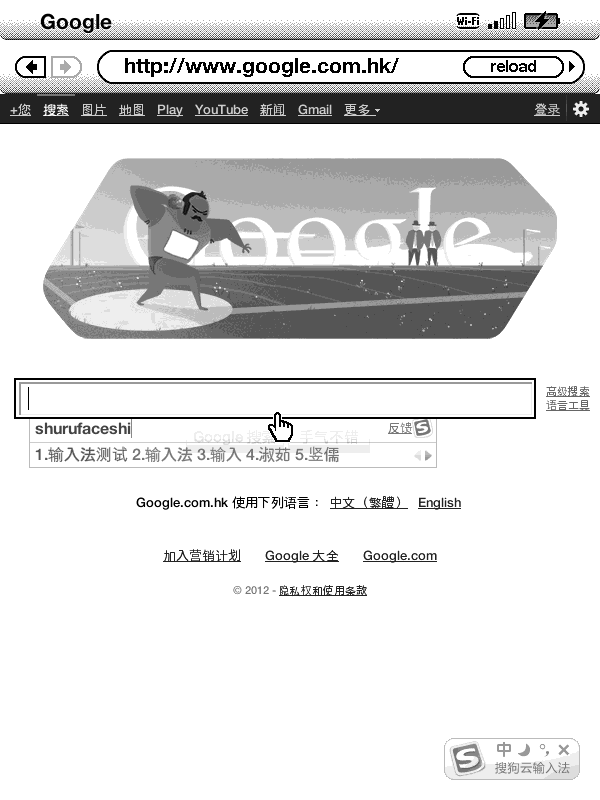
给Kindle 3浏览器集成中文云输入法 | Integrate Cloud IME on Kindle 3 Browser
最近入手了 Kindle 3 (3G+WiFi 美版),各方面感觉都不错,除了中文输入这一点……
解决方案有两个:
其一:使用CanBeFound兄编写的中文输入法
这个效果很好,支持联想还能储存用户词典。目前唯一的遗憾是英文符号的输入相比原来的符号键盘略有些不便,当然从中文的角度来说却是好太多了。
其二:使用基于Javascript的中文云输入法( Sougou, QQ )
此法有个局限,就是只能在浏览器里使用,不过多数时候对于中文输入的需求也就是源于上网,股沟摆渡神马的。
原理是利用浏览器的Article Mode,意即文章模式,启用此模式以后浏览器会把当前网页重新排版成适合Kindle浏览的风格。而其本质则是利用一个JavaScript的脚本对原来的页面内容进行处理。
脚本位置在此:
/usr/share/browser/readability/readability_min_utf16.js (脚本文件)
/usr/share/browser/readability/readability_min_utf16.css (CSS风格文件)
经过一番测试和选择,最后选用的是Sougou云输入法。另外备选的还有QQ云输入法,可惜实际测试中反应速度太慢所以被淘汰。
推荐个视频网站| Video Sharing Site Recommendation
最近偶然找到了一个视频分享网站(http://www.collegehumor.com),感觉相当有趣。原本是想找“屁股脸男孩”的视频的,转悠转悠就到了这儿,发现许多有趣视频,特此分享几个。
I recently came across an interesting website called CollegeHumor with loads of funny videos and therefore wants to share it with everyone. Here are some of my favourite ones.
首先就是这个了:
Tada! “The Boy With an Arse For a Face”: